
අද දින නවීන ව් යාපාරික හා අධ් යාපනික පරිසරයේ, සාමාන් ය වයිට්බෝධ ඉගැන්වීම්, ඉදිරිපත් කිරීම සඳහා අවශ් ය උපකරණ බවට පත් වෙලා, සහයෝගය, සහ ජාතික අන්තර්ජාල පරිපාලනය. මෙවලින්QtenboardNameසාමාන් ය වෛද් යවරුන් පරිශීලීන භාවිත කරන අයට ඉඩහැරිය හැකියි.
ගුණාංගය, ස්ථානය ප් රතිචාරය, සහ තිරයේ ප් රමාණය පෙන්වනවා, ක් රියාකාරිත්වයට බලපෑමට තවත් අත් යවශ් ය සාක්ෂිකරුවක්. සාමාන් යයෙන් යොදාගන්නා තත්වයක් මෙම සම්බන්ධතාවය අත් යවශ් ය වන්නේ අන්තර්ජාලය මාරුවීමට, උසස් විද් යාත්මක වීඩියෝ වාදනය කිරීමට, හෝ ව් යාපෘතිය ලබාගැනීමට.
දැන්,USB 2.0ඒ වගේමUSB 3.0සාමාන් ය සුදු පුවරු සඳහා දෙකක්. මේ ප් රමිති දෙක අතර වෙනස තේරුම්ගැනීම අත් යවශ් ය වෘත්තීයයි දත්ත හුවමාරුව වැඩි කරගන්න ඕන වෛද් යවරුන්ට, සහ මෙවැනි උපකරණ මත තහවුරු අන්තර්ගතය ස්ථානයට තහවුරු කරන්නQtenboardNameඅන්තර්ජාලය සුදු පුවරු.
මෙම ලිපිය පරීක්ෂා කරයිUSB 3.0විය2.0ක් රියාකාරකම්, වේගය, සම්බන්ධකත්වය සහ හොඳම භාවිත නඩුවන් ඇතුළු අන්තර්ජාලයක වෛද් ය පුවරුවල සංඛ් යාවQtenboardNameප් රමිති දෙකම සහය දක්වන විසඳුම.
USB සාමාන් ය සුදු පුවරුවල, USB බෝට්ටු අරමුණ ගණනාවක් සේවය කරනවා:
වෙන්නQtenboardNameඅන්තර්ජාලය සුදු පුවරු, USB දෙකම සහාය කිරීමට ඉන්ජිනේරු කරලUSB 2.0ඒ වගේමUSB 3.0, විවිධ උපකරණ සහ පරිශීලක අවශ් යතා සම්පූර්ණයෙන්ම ලබා දෙනවා. නිවැරදි USB සම්ප් රදාය තෝරාගැනීමෙන් කෙලින්ම ක් රියාත්මක කරන්න පුළුවන්, විශේෂයෙන් විශාල ගොනු හෝ HD වීඩියෝ ප් රවාහණය පාලනය කරන විට.
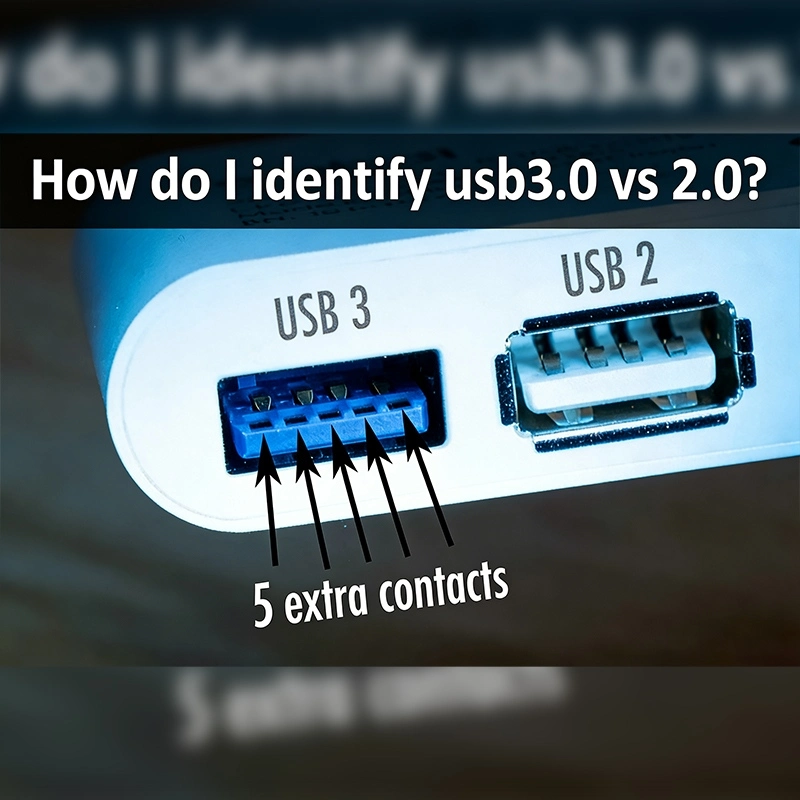
වෙලාවක්USB 2.0ඒ වගේමUSB 3.0දත්ත සම්ප් රේෂණයේ මූලික අරමුණ බෙදාගන්න, ඒවා එකම නෑ. වෙනස පවතී:
හැමදාම කාර්යාලයේ පරෙෆෙරල් වලට,USB 2.0ප් රමාණවත් යතුරු පුවරු සහ මිනිස් වගේ උපකරණ වලට. කෙසේවෙතත්, විශාල ලිපි, HD වීඩියෝ හෝ බහුල මාධ් ය අන්තර්ජාලය අන්තර්ජාලය වෛද් ය පුවරුවකට මාරුවීමේදී,USB 3.0වැදගත් ක් රියාකාරිත්වය ලබා දෙනවා.
වෙන්නQtenboardNameඅන්තර්ජාලය සුදු පුවරු, දෙකම සහාය කරන්නUSB 2.0ඒ වගේම3.0පරිශීලකයන්ට උපකරණය සම්බන්ධතාව, අන්තර්ජාල ප් රමාණය සහ වේගය මගින් පදනම් කර ඇති හොඳම අතුරුමුහුණත තෝරාගත හැකියි.
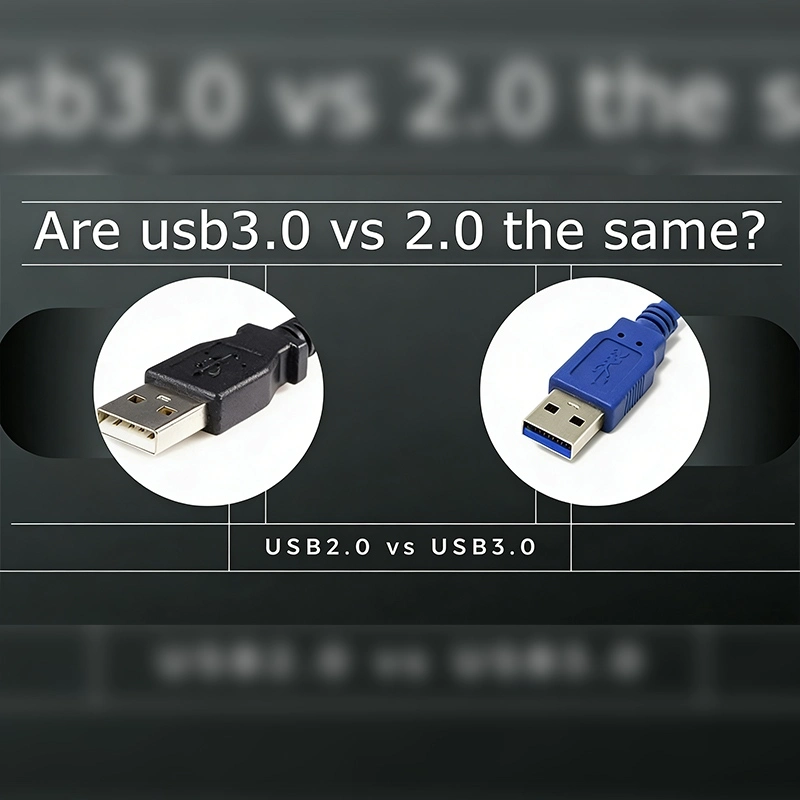
USB 2.0: සාමාන් යයෙන් සුදු අතුරුමුහුණු සහ පින් 4ක් තියෙනවා.
USB 3.0: "SS" (SuperSpeed) ලංගය සහ ස්ථාන දෙකකින් සැලසුම් කරන පින් 9ක් සමඟ නිල් වර්ණය.
මෙම වෙනස්කම් විතරක් නෙමෙයි - ඒවා වේගවත් දත්ත හුවමාරු වේගය හා දක්වන සන්නිවේදනය කිරීමේ හැකියාවUSB 3.0.
USB 2.0: බාග- දෙකක්ලස් හුවමාරුව භාවිත කරයි, දත්ත එක වතාවකට පමණක් එක දිශාවට පමණක් ගිය යුතුයි.
USB 3.0: සම්පූර්ණ- දෘෂ්ටිය හුවමාරු කරයි, එකම කාලෙදී දත්ත යවන්න සහ ලබාදීම ස්ථානය කරනව.
සාමාන් ය සුදු පුවරු වලට, මෙය අදහස් කරන්නේ ඔබට ඔබේ පරිගණකයෙන් ඉහළ අන්තර්ජාලය යවන්න පුලුවන්
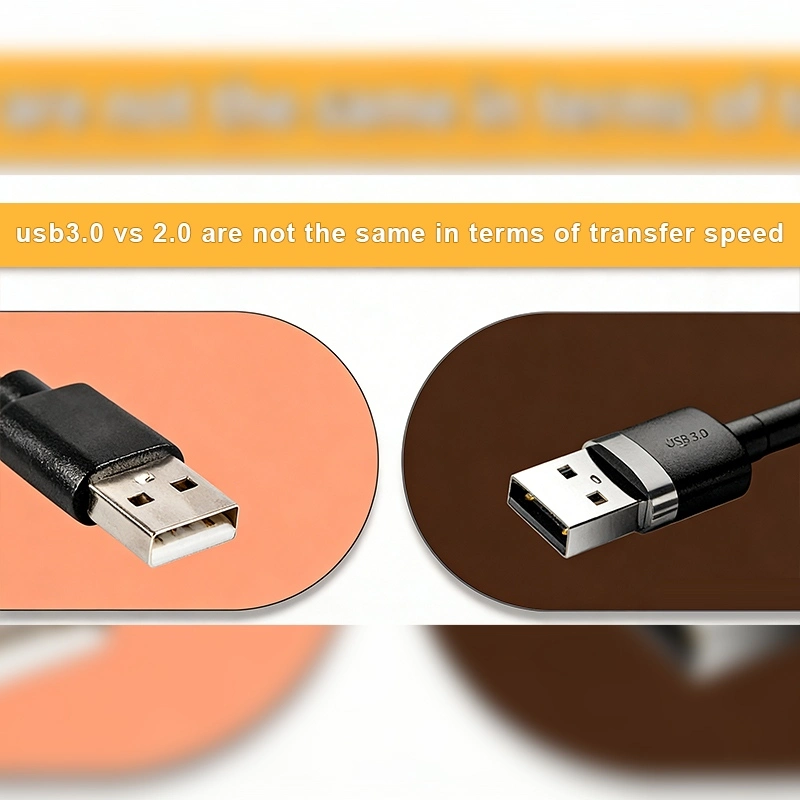
USB 2.0: උපරිම තොරතුරු වේගය480 Mbps
USB 3.0: උපරිම තොරතුරු වේගය5 Gbps(වේගවත් 10 වතාවකට වඩා)
ප් රායෝගිකව, විශාල වීඩියෝ ගොනුවක් මාර්ගය කරමින්USB 2.0තත්පර 20ක් ගන්න පුලුවන්USB 3.0සම්පූර්ණයෙන්ම සම්පූර්ණ කරන්න පුළුවන්.තත්පර 3-4. ව් යාපාරික මධ් යස්ථානයේ, පන්ති කාමර හා සහෝදර කාර්යාලවලට අනුව ඉක්මනින්ම යාවත්කාලීන විය යුතුයි.
USB 2.0: අඩු වේගය පාලක, මුද් රණය, යතුරු පුවරු සහ කුඩා ගොනු හුවමාරු සඳහා සුදුසුයි.
USB 3.0: HD දර්ශන, කැමරා, ගබඩා උපකරණ හා වෛද් ය විද් යුත් චුට්බෝඩ් සඳහා නිර්මාණය කර තිබෙනවා.
QtenboardNameඅන්තර්ජාලය සුදු පුවරු සුදු පුවරුවUSB 3.0විශාල HD විදිහට උපදෙස්, බ් රමාධිපති ස්ථානය, සහ වේගවත් අන්තර්ගත යාවත්කාලීන සහයෝගයUSB 2.0උපකරණ.
USB 3.0පසුපසට ගැලපීයයිUSB 2.0. මේකේ තේරුමUSB 3.0උපකරණයකට සම්බන්ධ කල හැකUSB 2.0පෝර්ය, නමුත් හුවමාරුවේ වේගය පෙරනිමි වේවිUSB 2.0සීමාවන්.
වෙන්නQtenboardNameඅන්තර්ජාලය සුදු පුවරු, මේ පසුපසට ගැලපීම සහතික වෙනවා:
වර් ණ කේතනය:
පින් ගණන:
නිවැරදි අනන් යතාව පරිශීලකයන්ට අන්තර්ජාල චිත් රපටියේ ක් රියාත්මක වන්න හැක දත්ත හුවමාරුව.
QtenboardNameඅන්තර්ජාලය පුද්ගලයන් නිර්මාණය කර තිබෙනවා. සමහර ප් රයෝජන ඇතුළත්:
අධි විසඳුමේ අන්තර්ජාලය, වලාකුළු සම්බන්ධතාව, සහ අන්තර්ජාලක අංගයන්, අනාගතය අන්තර්ජාලය සුදු පුවරුවලින් ප් රයෝජන ලබයි:
QtenboardNameදැනටමත් USB අතුරුමුහුණු අතුරුමුහුණු සම්බන්ධ කරලා තියෙනවා මේ ස්ථාන සහයෝගයෙන්, වෛද් ය සහ අධ් යාපනික පරිසරවල දිගු ජීවත් වීමට සහතික කිරීම.
අතර වෙනස තේරුම්ගන්න.USB 3.0ඒ වගේම2.0අත් යවශ් ය සුදු පුවරුවල ක් රියාත්මක කිරීමට අත් යවශ් යයි. වෙන්නQtenboardNameසාමාන් ය සුදු පුවරු, USB දෙකම සහය දක්වා සහතික කරනවා:
වෛද් යවරුන්, අධ් යාපනය හෝ ක් රිස්තියානීන් තෝරාගැනීමට සැලසුම් වන්නේ සුදු පුද්ගලයන්ටQtenboardNameදෙකම සමඟ සාමාන් ය සුදු පුවරුවUSB 2.0ඒ වගේම3.0සහය ලබා දීමේ අන්තර්ජාලය හුවමාරුව, මුළු මධ් යමය ප් රෙග් රහණය සහ ඉහළ අත්දැකීමක්.
උසස් USB අතුරුමුහුණු, ශක්තිමත් LCD පැනල්, සහ වෘත්තිමත් තාක්ෂණය එකතු කරමින්,QtenboardNameලොව පුරාම අධික ක් රියාකාරකම් සාමාන් ය ස්ථානය දිගටම ස්ථානය කරයි.
නිෂ්පාදක තොරතුරු කියවීමට ක්ලික් කරන්න එහි ක් රියාකාරකම් සහ සැබෑ ක් රියාකාරකම් ගැන ඉගෙනගන්න.
📖නිෂ්පාදකය කියවන්න
 SIN
SIN
 EN
EN  MAY
MAY  TH
TH  CHT
CHT  ID
ID  BUR
BUR  FIL
FIL  HKM
HKM  LAO
LAO  VIE
VIE