
අධ් යාපනයේ,පාසැලතවදුරටත් සාමාන් ය දෙයක් නෙමෙයි- ඒවා ඉගැන්වීම් සහ ඉගෙනීම වෙනස් කරන්නේ අත් යවශ් ය උපකරණ. ඩිජිජ් ය පන්තියේ කාමර වර්ධනය සමඟ, අධ් යාපනික තාක්ෂණය මත වැඩියෙන් විශ්වාස කරනවා ශිෂ් යයන්ව සම්බන්ධ කරන්න, පෞද්ගලික අද්දැකීමක් ලබාගන්න. Qtenboard Interacte Whiteboards පාසැල වලින් නිර්මාණය කරලා තියෙන්නේ මේ අධ් යාපන අවශ් යතා සාර්ථක කරවන්න, AI හැකියාවන්, සහ EDLA සහිත විශ්වාසවන්ත සහ ආරක්ෂිත පන්ති කාමරය භාවිතා කිරීම සඳහා.
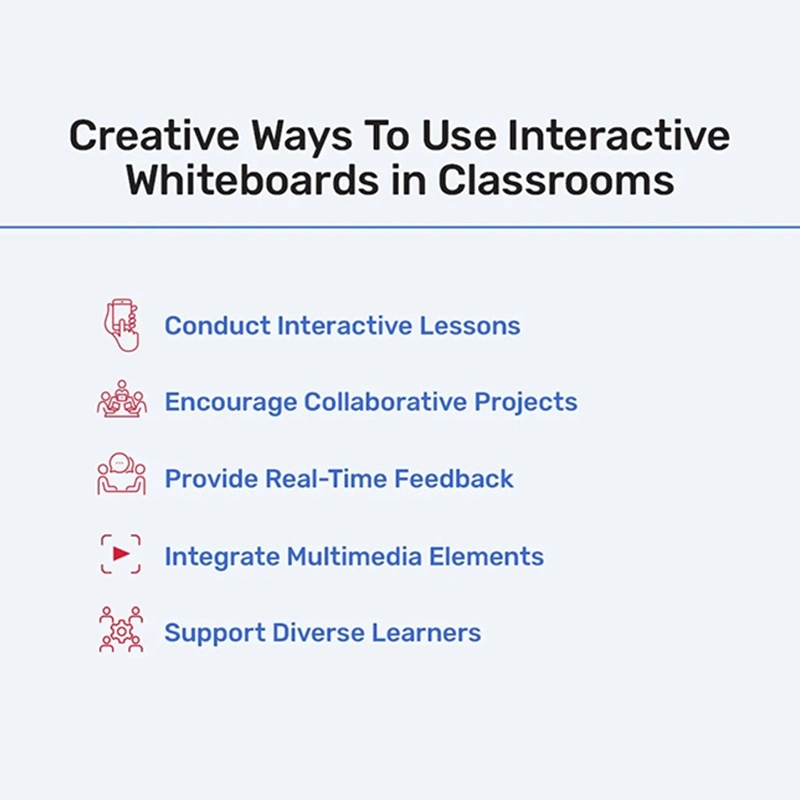
පර්යේෂණය ක් රියාත්මක වී තිබෙනවා. සාම්ප් රදායික විශේෂ පන්තියේ පන්තියේ කාමරය බොහෝවිට ශිෂ් යයන් අවධානය යොමු කරන්න අසමත් වෙනවා, අන්තර්ජාලය අධ් යාපන පරිසරය හොඳ ප් රතිඵලවලට මඟ පවතින අතරතුර. අන්තර්ජාලය වයිට්බෝඩ්ස් පාසැල වල නියම විසඳුමක් ලබා දෙනවා. සහ සහයක ක් රියාත්මක වන්නේ බොහෝ අධ් යාපන විට
මෙම මෙවලම් ගුරුවරුන්ට දෘෂ්ටිකෝණය පමණක් නොවෙයි. Qtenboard's AI-ලබාගත හැකි අන්තර්ජාලය වයිට්බෝඩ්ස් සමඟ, පාසල වල, ගුරුවරුන්ට පුලුවන් ශිෂ් යයන් සම්බන්ධකම් අධ් යාපනයට පුලුවන්, පෞද්ගලික උපදෙස් සඳහා යෝජනා ලැබෙනවා.
පාසැල්වල අධ් යාපනය වල ප් රධාන ප් රයෝජන එකක් තමයි පාඩම් තවමත් සාමාන් ය දෙයක් කරන්නේ ඔවුන්ගේ හැකියාව. ශිෂ් යයන් තවදුරටත් සාධාරණ නිරීක්ෂකයන් නොවෙයි- ඔවුන්ට පුලුවන් ද් රව් ය ප් රශ්නවලට පිළිතුරු දීමට සහයෝගය ලබා දෙනවා. Qtenboard අන්තර්ජාලය වයිට්බෝඩ්ස් පාසැල වල පාසැල අනුකරණය කර තිබෙනවා, ගුරුවරුන්ට ශිෂ් යයන්ගේ ප් රතිචාරය සහ ගිවිසුමට පදනම් කරමින් අන්තර්ජාලය සකස් කිරීමට උපකාර කරනවා.
පන්ති කාමරය උදාහරණය:
ශිෂ් යයන්ට ශිෂ් යයන්ට කණ්ඩායමක් හෝ කෙලින්ම ප් රශ්න විසඳීමට, කණ්ඩායමක් හෝ විසඳීමට ඉඩහැරිය හැකියි. මෙම අත්පොත අනුග් රහය ලබා දෙයි.
රසායනික ප් රතිචාර, ග් රහලෝක පද්ධතිය, හෝ ජීව විද් යාවේ පරීක්ෂණ වැනි සංක් රමණය, පුවත්පතේ ක් රියාත්මක කරන්න පුළුවන්, ශිෂ් යයන්ට සංකීර්ණ ක් රියාකාරකම් පෙන්වන්න උපකාර කිරීම.
ගෘහය හා වචන ක් රියාකාරකම් සම්බන්ධ කරගත හැකියි.
සාමාන් ය සිතුවිලි, අදහස් හුවමාරු කිරීම හා සමාන ක් රමය වර්ධනය කිරීමට සහභාගි වීම අත් යවශ් යයි. පාසැල් වල අන්තර්ජාලය වයිට්බෝඩ් සාමාන් ය ජාතික වැඩ ක් රමයක් සපයයි. ඊට හේතුව කුමක්ද?
Qtenboard's AI තාක්ෂණය තවදුරටත් සහයෝගය දක්වනවා, යෝජනා දීමෙන්, ශුභාරංචිය සමඟ, සහ ශිෂ් යයන්ව මඟ පෙන්වන්න ප් රශ්න විසඳන ව් යායාම්වලින්.
පන්ති කාමරය උදාහරණය:
ශිෂ් යයන් අදහස දායක වෙනවා. AI අදහස් සංවිධානය කරන්න, රටවල් ප් රයෝජනවත්, අමතර සම්පත් ලබාගැනීමට හැකියි.
ශිෂ් යයන්ට සැබෑ කාලෙදි එකිනෙකාගේ වැඩ ගැන විස්තර කරන්න පුළුවන්, AI සමඟ නිවැරදි සහ පැහැදිලි දියුණුව සහතික කිරීම සඳහා නිවැරදි ප් රතිචාරය දෙනවා.
ශිෂ් යයන්ගේ මිතුරන්ව සම්බන්ධ වීඩියෝ, පින්තූර හා සම්බන්ධ සංඛ් යාව යොදාගන්න පුළුවන්.
ඉක්මනින්ම ප් රතිචාරය වන්නේ අධ් යාපනයට යම් අවධානය යොමු කිරීමයි. ශිෂ් යයන් ප් රතිචාරය ලබාගැනීමට, අවශ් ය වන විට අධ් යාපනය ලබා දීමට ගුරුවරුන්ට ඉඩ දෙනවා. AI-ලැබිණ Qtenboard උපකරණ සැබෑ කාලයේ පිළිතුරු විශ්ලේෂණය කරන්න පුළුවන්, සාමාන් ය වැරදි හඳුනාගන්න, සහ ශිෂ් යයන්ට පෞද්ගලික අනුගාමික ව් යායාම යෝජනා කරන්න.
පන්ති කාමරය උදාහරණය:
ගුරුවරුන්ට පුලුවන් විශ්ලේෂණය කරන්න ඒ වගේම AI පුලුවන් පරීක්ෂණය අවශ් ය ප් රදේශ හෝ පරීක්ෂණය අවශ් යයි.
ශිෂ් යයන්ට වැරදි පිළිතුරු ලබා දෙනවා.
ගුරුවරුන්ට පුලුවන් ශිෂ් යයන් වැඩ ගැන කෙලින්ම වැරදි දක්වන්න, වැරදි ප් රයෝජනයක් හෝ සැබෑ කාලෙදී මඟ පෙන්වීම් ලබා දෙනවා.
Qtenboard අන්තර්ජාලය වයිට්බෝඩ්ස් පාසලට සහය දක්වන වීඩියෝ, පිංතූර, 3D මාඩු, දර්ශන, ශරීරය සහ ක් රිස්තියානි පාඩම් නිර්මාණය කිරීමට ශ් රේෂ්ඨ පාඩම් නිර්මාණය කිරීමට. AI පාඩම් අරමුණ, ශිෂ් යයන් සම්බන්ධකම් සහ දැනුම අඩුපාඩු මත පදනම් වෙන්න පුලුවන්.
පන්ති කාමරය උදාහරණය:
ශිෂ් යයන් සිතියම්, ප් රදේශ හා සංස්කෘතිය පරීක්ෂා කරනවා. AI පුලුවන් ගිවිසුම ලුහුබැඳීම සහ ගැඹුරු අධ් යයනය සඳහා ප් රතිපත්ති දක්වන්න.
සංකීර්ණ සංකීර්ණ සංකීර්ණ හෝ අණුදිය ජීව විද් යාව 3D වලින් දර්ශන පුළුවන් ඒ වගේම හොඳ තේරුම්ගැනීම සඳහා වස්තුවක් පාවිච්චි කරන්න.
කාල ලිපි, ඉතිහාසඥ පින්තූර සහ වීඩියෝ අංශය විසින් ඉදිරිපත් කළ හැකියි.
සියලුම ශිෂ් යයන් සම්පූර්ණයෙන්ම අධ් යාපනය අවශ් යයි. පාසැල Qtenboard ශිෂ් යයන්ගේ පෞද්ගලික ඉගෙනගැනීමේ අවශ් යතාවලට හැසිරෙනවා.
පන්ති කාමරය උදාහරණය:
ක් රිස්තියානි රූප, චාරිත් ර හා වර්ණ-කේතනය ලබා දීමට අවබෝධයක් ලබා දෙනවා.
පේතෘස්ට භාෂාව හා ඇතුළත් ශ් රේෂ්ඨ ශබ්ද විස්තර පාඩම් ශක්තිමත් කරයි.
සංකීර්ණ හා ක් රීඩා සමඟ සම්බන්ධකම් සක් රීය අධ් යාපනය සහය දක්වනවා.
AI අන්තර්ජාල සංකීර්ණතාව හා සංකීර්ණ ක් රමය සකස් කරයි, ශිෂ් යයන්ගේ අවශ් යතාවලට ගැලපෙනවා, ඇතුළත් කිරීම ලබා දීමට.
දුරස්ථ අධ් යාපනය අධ් යාපනය සමඟ, පාසැලවල අධ් යාපනික වයිට්බෝඩ්වල පන්තික කාමරවල සම්බන්ධකම් පවත්වාගැනීමට අත් යවශ් යයි. Qtenboard's AI ක් රියාමාර්ගය දුරස්ථ සම්බන්ධතාව සහය දක්වනවා, ශිෂ් යයන්ට ගෙදරින් හෝ වෙනත් ස්ථාන සම්බන්ධ කරගැනීමට ඉඩ දෙනවා. ගුරුවරුන්ට පාඩම් බෙදාගන්න, සම්බන්ධයෙන් හවුල් වීමට හා පෞද්ගලික මඟ පෙන්වීම් ලබාගැනීමට හැකියි.
පන්ති කාමරය උදාහරණය:
දුරස්ථ ශිෂ් යයන්ට සැබෑ වෙලාවේ පාඩම් සමඟ සම්බන්ධ කරගන්න පුළුවන්.
ශිෂ් යයන්ට අමතර සහයෝගය අවශ් ය හා ඉලක්ක ව් යායාම් ලබා දෙනවා.
ශිෂ් යයන්ට තමන්ගේම වේගයෙන් තොරතුරු නැවත සොයාගැනීමට හැකියි.
පාසැල් පාසැල් අධ් යාපන වයිට්බෝඩ්ස් අනුකරණය කළ විට, ශිෂ් යයන් දත්ත ආරක්ෂා කිරීම වැදගත්. Qtenboard's EDLA-තහවුරු උපකරණ ශක්තිමත් ආරක්ෂිත පිවිසුම් සපයනවා, ආරක්ෂිත පිවිසුම්, සංකේතනය කරන ගබඩාව ඇතුළත්, සහ පාඩම් භාෂාවට පාලනය කරලා. AI අංක දත්ත පෞද්ගලිකත්ව නීතිවලට එකඟයි.
පාසැල වල අන්තර්ජාලය වයිට්බෝඩ් පාසැල වල තාක්ෂණික අංශය විතරක් නෙවෙයි- ඔවුන් පරිවර්තන අධ් යාපන මෙවලම්. Qtenboard අන්තර්ජාලය වයිට්බෝඩ් එකතු කරමින්, පාසැල තුළදී, අධ් යාපනය, අන්තර්ජාලය හා අධ් යාපන පරිසරයක් නිර්මාණය කළ හැකිය. AI හැකියාවන් ඉගැන්වීමේ හැකියාව දියුණු කරවන්න, පෞද්ගලිකව පුද්ගලයන්, සහ විවිධ ශිෂ් යයන් අවශ් යතා සහයෝගයි EDLA සහතිකය ආරක්ෂාව සහ එකිනෙකාව තහවුරු කරනවා.
දිගු පන්ති කාමරය දිගටම පරිණාමය වෙමින්, අධ් යාපනයේ අනාගතය සකස් කිරීමේ වැදගත් වයිට්බෝඩ් ශිෂ් යයන් ශිෂ් යයාට සහභාගි වීමට හා ඉගැන්වීම් ප් රතිඵල දියුණු කරගැනීම සඳහා ක් රිස්තියානි වර්ධනයක් ලබා දෙනවා.
සොයා බලන්න කුට්න්බෝඩ් අන්තර්ජාලය වයිට්බෝඩ් වල පාසල වල පන්ති කාමරය සම්බන්ධයෙන් අපිව නිදහස් කරමින් හා නිදහසට සම්බන්ධ වෙන්න.
නිෂ්පාදක තොරතුරු කියවීමට ක්ලික් කරන්න එහි ක් රියාකාරකම් සහ සැබෑ ක් රියාකාරකම් ගැන ඉගෙනගන්න.
📖නිෂ්පාදකය කියවන්න
 SIN
SIN
 EN
EN  MAY
MAY  TH
TH  CHT
CHT  ID
ID  BUR
BUR  FIL
FIL  HKM
HKM  LAO
LAO  VIE
VIE