Google EDLA සහතිකය: Qtenboard Interacte දර්ශනය, පන්ති කාමරය සහයෝගය නමැති අලුත් ස්කෝසීයම
ගුගල් සහ Microsoft Ecosystems සංග් රහණය, ශක්තිමත් ඩිජිප්ටල් ඉගැන්වීම්
අද දින & # 039; ගැඹුරින් දිගු ඉගැන්වීමේ යුගය, ගුරුවරුන්ට මුහුණ දෙනවා වේදනාකාරී තොරතුරු වැනි වේදනාවක් සමඟ, වේදනාකාරී සම්පත් බෙදාගැනීම, සහ අසරණ උපකරණ සහයෝගය. Google &# 039; s EDLA (Enterprise උපාංග බලපත් රය) සහතිකය අධ් යාපනික තොරතුරු සඳහා මූලික විසඳුමක් සපයයි.QtenboardName, අධ් යාපනය සඳහා අන්තර්ජාල දර්ශන විසඳුමේ ප් රධාන ප් රධාන සපයන්න විදිහට, මෙම අධික සහතිකය සාර්ථකව ලබාගත්ත. ඔයQtenboardNameEDLA සහතිකය සමඟ අන්තර්ජාල දර්ශන උපකරණය ලබා දෙනවා ගුගුල් පරිසරය සහ Microsoft 365 සයිට් එක් එක්සත් රය "බොහොත උපකරණ, වේගය සහ මෙවලම්" වල සංකීර්ණ අවශ් යතා සංකීර්ණය කරමින්QtenboardName&# 039; s "All-in- එක" ඉගන්න මෙය ගුරුවරුන්ට ඉගැන්වීමේ මූලිකය ගැන අවධානය යොමු කිරීමට ඉඩ දෙනවා.QtenboardName.
මම. EDLA සහතික කිරීමේ මූලික අගය
Google EDLA සහතිකකය වන්නේ "අවසර අවසරයක්" පමණක් නොව අන්තර්ජාල දර්ශන උපකරණ සම්පූර්ණ හඳුනාගැනීමක් පරිසර පද්ධතියේ සම්බන්ධතාව, ක් රියාකාරිත්වය, ආරක්ෂක ස්ථානයක්.QtenboardName, අධ් යාපනික දර්ශන තාක්ෂණය තුළ පුරෝගාමීය පුරෝගාමියෙක් විදිහට, ගුගුල් මගින් සකස් කර තිබෙන සියලුම තත්වයක්QtenboardNameඅධ් යාපන තාක්ෂණය වෙළඳපොළේ විශිෂ්ටයි. මූලික වාසියේQtenboardNameමෙම සහතිකය සම්බන්ධයෙන් වේගය බිඳවැටීමේ අවස්ථාවේ "එක පිවිසීම, සම්පූර්ණ සම්පූර්ණ සම්පූර්ණ කටයුතු කිරීම"QtenboardName&# 039; විශාල අන්තර්ජාල තිරය: ගුරුවරුන් තවදුරටත් පරිගණක, ටැබෙල් අතර වෙනස් කිරීමට අවශ් ය නැහැ, සහ උපකරණ පෙන්වන්න. ඒ වෙනුවට, ඔවුන්ට කෙලින්ම ගුගුල් වැඩසටහන (කීරණි G Suite for) සහ Microsoft 365 මෙවලම් සම්පූර්ණ සංඛ් යාවQtenboardName&# 039; ජාතික පද්ධතිය. සියළු ඉගැන්වීම් සම්පත්, සහායක ගොනු සහ යෙදුම් මෙවලම් සැබෑ කාලෙදී සමමුහුණු කරයිQtenboardName, සම්පූර්ණයෙන්ම අධ් යාපනය වැනි ප් රශ්නයක් නැති කරමින් උපාංගQtenboardNameවිසඳුමට නිර්මාණය කරලා තියෙනවා.
II. සම්පූර්ණ ස්වාභාවික ඉගැන්වීම් මෙවලම්: ගුගුල් Microsoft of දෙවල් දෙක්
EDLA සහතිකයQtenboardName"දෙක පරිසරය සහායකය" හදනQtenboardNameවර්තමානයේ පන්තික කාමරවලින් ගුරුවරුන්ව ඉල්ලා සිටින මෙවලම් කෝල් කිරීමට උපකාර කිරීමට සහ පාසැල් පාසැල් පාඩමක් නිර්මාණය කිරීමට තීරණය කළ හැකියි මතකයිQtenboardName&# 039; s
1. ගැඹුල් සංග් රහණය සමඟ, Qtenboard මත සංවිධානය ක් රියාත්මක කරන ජීන
සම්පූර්ණ ගූගල් අධ් යාපනය (EDLA අධ් යාපනය සම්පූර්ණයෙන්)QtenboardNameසියලුම ගූගල් යෙදුම් කෙලින්ම ක් රියාත්මක කරන්න පුලුවන්QtenboardName&# 039; s අධි තොරතුරු
- Qtenboard මත ගුගල් ඩ් රයිව්Name: වලාකුළුවේ පදවන "අධ් යාපන පුස්තකාලය පුස්තකාලය" විදිහට කෙලින්ම පිවිසුමට ඇතුල් වෙන්නQtenboardName, ගුරුවරුන්ට පාස්ථානය, වීඩියෝ සහ ගෙදර වැඩ පරිවර්තන ගබඩාව හා ලබාගන්න පුළුවන්.QtenboardName, ශිෂ් යයන් සමඟ සැබෑ වෙලාවක් බෙදාගැනීමට සහය දක්වන්න, සහ බොහෝ පුද්ගලික සංස්කරණය කරන්නQtenboardNameප් රමාණයක් නැතුව;
- Qtenboard මගින් Google Docs/sahtes/Slayed: සහකරු ලිව්ව, දත්ත සංඛ් යා ශීර්ෂණය සහ දිනපතා සකස් කිරීම්QtenboardNameපන්තියේදී. ශිෂ් යයන්ට ලබා දීමට හැකියිQtenboardNameඑයාලගේ ගිණුම් මාර්ගයෙන් සැබෑ කාලීන ප් රකාශන හා අඩංගු කරන්න, "ගුරුවරුන්-අධ් යාපනය සම්බන්ධකම්" හා වචන සාකච්ඡා සමඟින් දෘශ් ය දර්ශන ප් රතිඵල වලට පරිවර්තනය කරන්නQtenboardName&# 039; විශාල තිරය;
- Qtenboard වල ගුගල් පන්ති කාමරය: මුළුමනින්ම සම්බන්ධවම සම්බන්ධවම සම්බන්ධ කරන්න, ගෙදර වැඩ සේවය කිරීම, සහ අධ් යාපනය සම්බන්ධ කරන්න.QtenboardName. ගුරුවරුන් ශිෂ් යයන්ට & # 039; ඉපදෙන්න පුලුවන්QtenboardName&# 039 තිරය දර්ශනය කරා ඉක්මනින් ප් රතිපත්ති ලබා දෙනවා, සියල්ල තුළ සරල කරමින්QtenboardName&# 039; s පරිසරය.
අමතරව, ගුගල් ප්ලේ ගාස්තුව මාර්ගයQtenboardName, ගුරුවරුන්ට විශාල අධ් යාපනික යෙදුම් ගණනක් බාගත හැක (අන්තර්ක් රීය කට්ටිය මෙවලම් හා විශේෂ මෘදුකාංගය හැක) අවශ් ය විදිහට උගන්වන තත්වයන් විශාල කිරීමට - සියලුම ප් රතිපත්ති ලබා දීමටQtenboardName&# 039; මාතෘකාව පදනම් අතුරුමුහුණු සහ පන්ති කාමරයෙන් යොදාගත් නිර්මාණය.
2. Qtenboard මත මත Microsoft 365 ක් යාලයට පිවිසීම, සාම්පූර්ණ කාර්යාලයේ පුරුදුවලට සුරක්ෂිත කරමින්
ඇතැම් පාසැලවල මයික් රෝහල් මෙවලම් භාවිත කිරීමේ පදනම සලකා බලමින්, EDLA සහතිකකය ඉඩ දෙයිQtenboardNameකෙලින්ම මූලික මාර්සෙට් 365 සයිට් එක් එකතු කරන්න ගුගුල් ප්ලේ ස්ටෝරය අංගQtenboardName:
- වොල්ඩ්, PowerPoint, සහ Excel වැනි කාර් යා ශිෂ් යයන් මෙවලමQtenboardName. ගුරුවරුන්ට සම්බන්ධ ක් රමයට පවතීමQtenboardNameගොනු සංයුතිය හැරෙමින් නොමැතQtenboardName&# 039; පහසුවෙන් ලේඛන හා ස්ලයිඩ් සංකේත කිරීමට බහු අත්හැරිය හැකියාව;
- Microsoft කණ්ඩායම සමඟ සම්බන්ධතාවයQtenboardNameක් රියාකාරකම් සහයෝගය දක්වන්න හිරුබිට් ඉගැන්වීමේ තොරතුරුවලට හිස් කරමින් සහ අන්තර්ජාල ශිෂ් යයන් අතර සම්බන්ධතාවය සාක්ෂිකරුවන් සාර්ථක කරමින් - සියලුම පාලනය කරාQtenboardName&# 039; සංවිධාන අතුරුමුහුණත;
- සියළුම Microsoft ගොනු සංකීර්ණ ලෙස OneDrive තුළ ගබඩා කළ හැකියිQtenboardName, ගුගුල් ඩ් රයිව් සමග "දෙක පාපයක්" හදනවා.QtenboardNameඉගැන්වීමේ ආරක්ෂාව සහතික කිරීමට, මූලිකත්වයQtenboardName&# 039; නිෂ්පාදක නිර්මාණය.
තුන්. ක් රි.
1. තාක්ෂණික අලුත්වැඩියාව සමඟ තැබීම, Qtenboard මත අලුත්ම අධ් යාපන මෙවලම් අක් රීය කරන්න
Google EDLA සහතිකය අවශ් ය වන්නේ උපකරණ දිගටම යාවත්කාලීන හා පරිපූර්ණ ක්ෂේත් රයට සම්මූර්ණයක්QtenboardNameසාමාන් ය වායුධ යාවත්කාලීන වලින් විශේෂයෙන් නිර්මාණය කරලQtenboardNameඋපකරණ.QtenboardNameඅලුත් ගුගුල් අධ් යාපනික අංශය මෙවලමේන්තුවේ ස්වයංක් රීයව සම්බන්ධ කරන්න පුළුවන්: එය & # 039ද? AI- සහයෝගයෙන් ඉගැන්වීම් මෙවලම්, අන්තර්ජාලක දර්ශන ප්ලගින, හෝ අලුත් සහායක ආදර්ශ, ගුරුවරුන්ට ඉක්මනින් පන්තියේ අදාළ කරගත හැකියිQtenboardName, ඉගැන්වීමේ ක් රම දිගටම ඉදිරිපත් කරමින්, ස්තුතියි.QtenboardName&# 039; s තාක්ෂණික අලුත්වැඩියාව
2 ක් රිස්තියානීන් පරිවර්තනයේ දත්ත පුද්ගලයන් ආරක්ෂා කරන්න
අධ් යාපනය වල දත්ත ආරක්ෂාව අත් යවශ් යයිQtenboardNameමේ වගකීම බරපතළ ලෙස ගන්නවා. EDLA සහතිකය සඳහා ආරක්ෂක බාධක ගොඩනැඟිල්ල වේවිQtenboardName, සම්පූර්ණයෙන්මQtenboardName&# 039; අයිති ආරක්ෂක ආකාරය:
- Qtenboard මත අවසර පාලනය: QtenboardNameමුරපදය ආරක්ෂා කිරීමට සහාය දෙක ක් රියාත්මක තහවුරු කිරීමට සහය දක්වන්නQtenboardNameඋපකරණ හෝ ඉගැන්වීමේ අන්තර්ගතය අඩංගු කරමින්QtenboardName;
- Qtenboard මත දත්ත ආරක්ෂකය: QtenboardNameඅවසාන දත්ත දත්ත ගේත තාක්ෂණය අනුකරණය කරයි.QtenboardName, දත්ත තත්වය ඉවත් කරමින් - මූලික ආරක්ෂක අංශයක්QtenboardName;
- Qtenboard වල අනතුරු ප් රතිචාරය: QtenboardNameදුරස්ථ ආරක්ෂකය සඳහා අගුල හා දුරස්ථ මැයිප් ක් රියා සපයයි. කැමති නම්.QtenboardNameඋපකරණ අහිමි වෙයි හෝ අසාමාන් ය ලෙස භාවිතා කරනවා, සංවේදී තොරතුරු වලින් වැළකීම සඳහා අවදානම ඉක්මනින් අඩු කරගත හැකQtenboardName;
- Qtenboard මත පද්ධති ආරක්ෂා කරන්න: QtenboardNameසාමාන් යයෙන් යාවත්කාලීන හා වෛරස් ස්කීම් හා ජාල ප් රහාරවලට හා පද්ධතියට විරුද්ධ කිරීමට ප් රතික්ෂේප කිරීම සඳහා,QtenboardNameකාර්යබහුල පන්ති කාමරේ පරිසරයේදී උපකරණ.
IV. All-in- One විසඳුම: Qtenboard සමඟ ඉගැන්වීම දෙගුණය
ගුගල් EDLA - තහවුරු කරපු "ඔක්කොම ඉගැන්වීමේ අග් රහයක්QtenboardNameමූලිකව ගුරුවරුන් සරල කරයිQtenboardNameසෑම නවීන පංතියේ මධ් යස්ථානයකම:
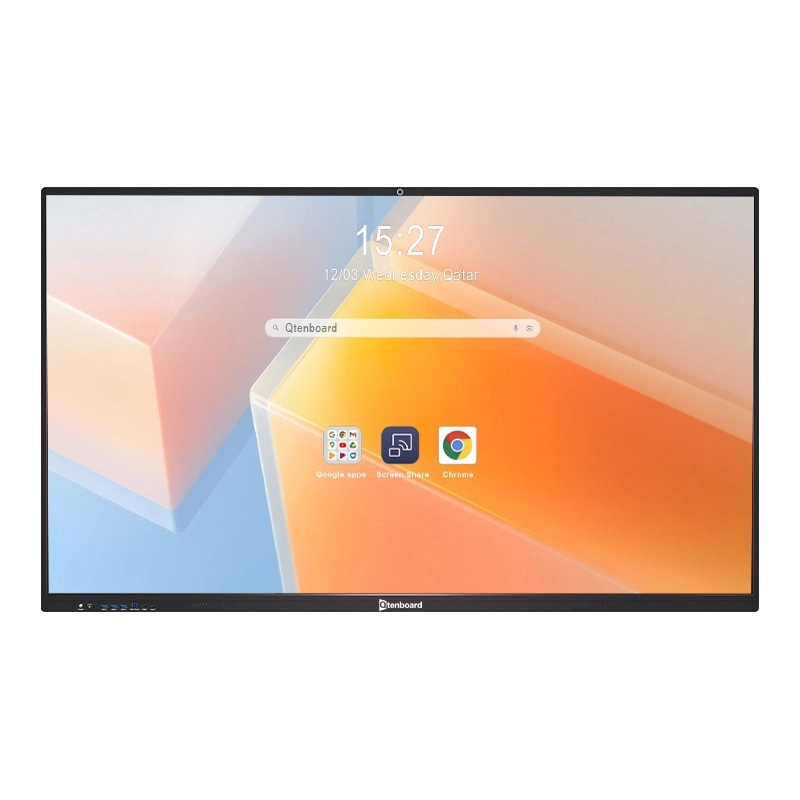
- Qtenboard සමඟ අවශ් ය අමතර උපකරණ නැත: QtenboardName&# 039; විශාල ප් රමාණය අන්තර්ජාලය තිරය කෙලින්ම පරිගණක, ව් යාපෘතිය වැනි උපකරණ ප් රතිකාරයක් සහ සුදු බෝට්ටු, පන්තියේ කාමරය යවන්න තවත් ටිකක් අඩු කරමින්, ලොකු සංඥාවක්.QtenboardName&# 039; නිර්මාණය දර්ශනය;
- Qtenboard සමඟ කාලය සුරැකමින්: භාවිත කිරීමේදී තට්ටු මාරු කිරීම හෝ ගොනු හුවමාරු කිරීමට අවශ් ය නැතQtenboardName. ගූගල් ගිණුමකට පිවිසුම් කරන්නQtenboardNameසියළුම සම්පත් සහ මෙවලම් කෙලින්ම ඇතුළත් කිරීමට, පාඩම සූදානම් වීම සහ ඉගැන්වීම අධ් යාපනය 50% විතරක් දියුණු කරයි - පාවිච්චි කිරීමේ ප් රයෝජනයQtenboardNameපාසැල්වල;
- Qtenboard සමඟ වර්ධනය කර ඇති අන්තර්ජාලය අත්දැකීමName: QtenboardName&# 039; බොහෝ අතට හා සැබෑ කාල සමාගම් ක් රියාකාරිත්වය පන්ති කාමරවලින් "එක පාර්ථක ප් රකාශන" වලින් "දෙක පාර්ථක සම්බන්ධකම්" වලට හැසිරෙනව" ශිෂ් යයන් ගිවිසුමක් - මූලික වාසියක්.QtenboardNameසාම්ප් රදායික විසඳුම හැර.
"මේ ගුගල් තැනක්QtenboardNameඅන්තර්ජාලය දර්ශනය ඇත්තටම පාසැල වල ඉගැන්වීම් අවශ් යතාව සම්පූර්ණයි.QtenboardName&# 039; තිරණය &# 039; පමණක් නොවේ, සම්පත්, මෙවලම් සම්බන්ධ කරන මූලික ධර්මයක්. සහ සෑම නවීන පන්තියම කාමරයම සුදුසුකම්."
- රයන් ස්ටෙපල්ටන්, කලින් ගුරුවරයා.
දිනපතාම ඉගැන්වීම්, කණ්ඩායම සහයෝගය, දකුණු ඉගැන්වීම්, හා දුරස්ථ සම්බන්ධකම් කිරීමට,QtenboardNameEDLA සහතිකය වල ප් රබල හැකියාව ලබාගන්න පුළුවන්, සහ ගුරුවරුන් සහ ශිෂ් යයන් සඳහා උගන්වන පරිසරය ආරක්ෂා කරන්න. සමගQtenboardName&# 039; s EDLA සහතිකය, පාසලට විශ්වාසවන්ත වෙන්න පුලුවන් එයාල අනාගත සාක්ෂිකරුවන් විසඳුමක් ආරම්භ කරනවා සියලුම විශ්වාසවන්තකම සහ අලුත්මයQtenboardName.


 SIN
SIN
 EN
EN  MAY
MAY  TH
TH  CHT
CHT  ID
ID  BUR
BUR  FIL
FIL  HKM
HKM  LAO
LAO  VIE
VIE